- NEW
- KIT + APP
Business Kit + app
The Complete Handyman Business Starter Kit
Price handyman jobs four ways, control scope with change orders and a refer-out system, and run the business in a local-first app.
$37 one-time
7 business kits, $37 one-time each · See the Cleaning kit
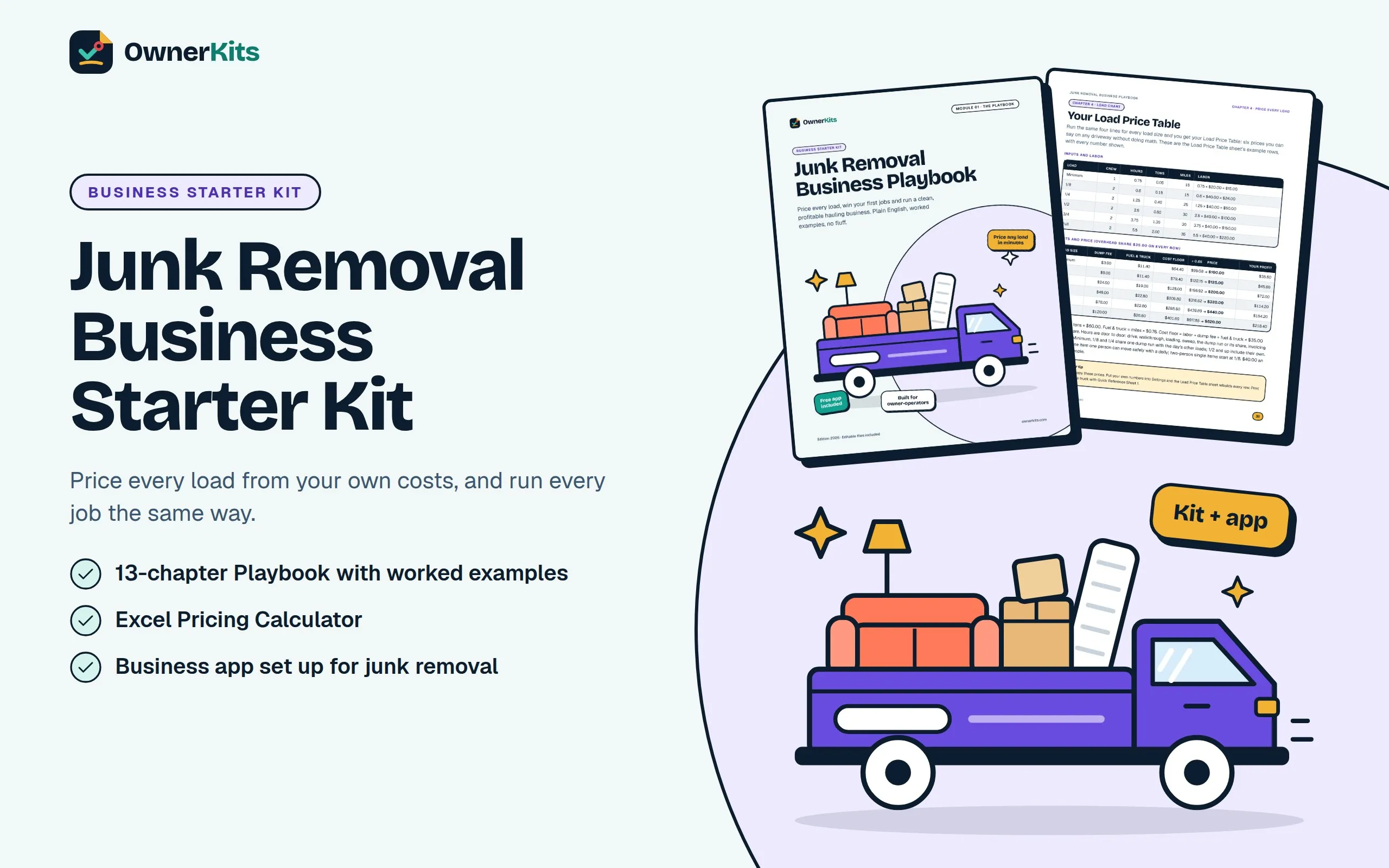
Price every load, win your first jobs and run a clean, profitable hauling business: a Playbook, templates, Excel calculators and the Business Command Center app.
$37one-time
Buy now Try the free demo first· no sign-up✦ In the box
✦ About this kit
A ready-made system for starting or organizing a junk removal business: single items, load-based pickups, clean-outs, labor-only dumpster loading, estate projects and partner work. The main guide is a 13-chapter illustrated Playbook in four parts (Set up, Price & win, Do the work, Run & grow), with a worked example in every chapter. The download also has 20 SOPs, 24 checklists, 10 forms, quote and invoice templates, marketing tools and AI prompts, with an editable Word version of every PDF and four Excel workbooks.
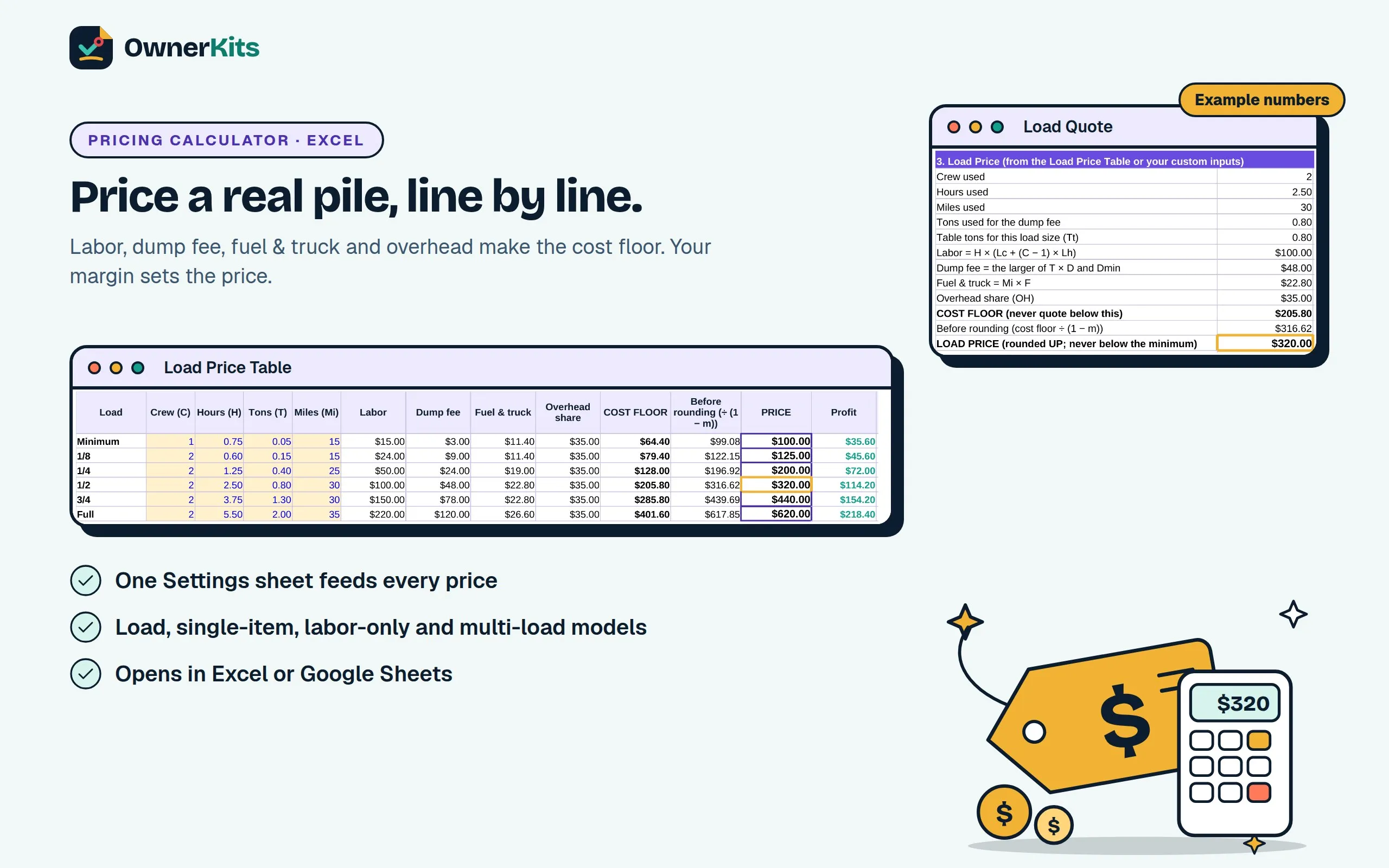
The pricing tools work from your own costs: one Settings sheet takes your crew wage, monthly overhead, jobs per month, dump rate, truck cost per mile and margin, then builds a cost floor and a price for every load size from Minimum to Full, plus single items with surcharges, labor-only jobs and multi-load clean-outs with a deposit. Every price is an example to replace.
A Green / Yellow / Red lane framework runs through the whole kit, so you know what to quote, what to verify first and what never to haul. The kit lists permits, vehicle rules, insurance and disposal rules as topics to verify locally; it does not give legal advice or handling instructions for hazardous items.
Your purchase also includes a license for the Business Command Center: a browser app for customers, leads, quotes, jobs, invoices, payments, expenses and reports, set up with junk removal services, surcharges and job fields such as Load Size, Estimated and Actual Tons, Dump Fee, Weigh Ticket # and Lane Check. Your business data stays on your devices, the app works offline after setup, and it exports to Excel whenever you want.
A price for every load size
Your wage, dump rate, truck cost and overhead become a cost floor and a price from Minimum to Full, plus single items, labor-only and clean-out projects.
Price before you lift
A photo estimate range, an on-site walkthrough script and a Green / Yellow / Red lane check, so the price is agreed before anything moves.
Kit + app, one price
The downloadable Starter Kit and a Business Command Center license for one junk removal business. Your data stays on your devices.
✦ What's included
✦ Features
Labor, dump fee, fuel & truck and your overhead share add up to a floor you never quote below. Your margin sets the price.
Six load sizes from Minimum to Full, each with crew, hours, tons and miles you can change. Prices rebuild from your Settings.
Heavy debris that runs past a row's tons gets an Overweight Charge worked out from your dump rate.
A Minimum or 1/8 base plus separate lines for mattresses, tires, refrigerant appliances, TVs, hot tubs, pianos and stairs.
Dumpster loading with a billable-hour minimum, and multi-load projects with sorting time, donation runs and a deposit.
Green, Yellow and Red items, a stop rule and refused-item wording. No handling or demolition instructions.
Estimated vs actual tons on every job and a Weigh Ticket Log with your real dollars per ton.
An Account Rate Sheet, rental turnovers, estate clean-outs and work order numbers on every invoice.
20 procedures and 24 checklists that walk every job from the first photo to the end-of-day close-out.
20 situations, from asking for photos to price changes on site and refused items, in email, SMS and WhatsApp.
A 30-day marketing plan, 270 social posts, a Meta ads kit for your services and 100 AI prompts.
Customers, quotes, jobs, invoices, expenses and reports in your browser, with junk removal fields built in.
Portable backup files, optional encryption, restore on a new computer.
Export everything, edit in Excel, import with a preview and change review.
✦ How it works
Checkout is handled by Gumroad. You pay once, with no subscription.
Your receipt email has the download link and your license key.
Open the Pricing Calculator's Settings sheet and replace the example wage, overhead, dump rate and truck costs with yours. Your load prices update from there.
Go to app.ownerkits.com, choose Get started and paste your key. Add customers, send quotes, schedule jobs and invoice, online or offline.
✦ Software
Already bought it? Open Business Command Center →
✦ Free guides and tools
Practical guides and a pricing calculator, free to use before or after you buy.
✦ FAQ
A download (one ZIP) and a license key. The ZIP holds 16 PDF guides and templates, an editable Word version of each, and 4 Excel workbooks. The license key activates the Business Command Center app in your browser.
It shows you how to work out your own prices. You enter your crew wage, overhead, jobs per month, dump rate, truck cost per mile and margin, and the calculator builds your load price chart. Every price in the kit is an example based on example costs, not a recommendation or your local going rate.
You mark your truck bed in eighths with tape and price by how full the pile makes it: Minimum, 1/8, 1/4, 1/2, 3/4 or Full. Each size has its own cost floor and price. Heavy material gets an Overweight Charge, because the dump charges by weight.
Single items start from your Minimum or 1/8 price, with separate surcharge lines for items that cost you extra to dispose of, such as mattresses, box springs, tires, TVs and appliances with refrigerant. The surcharges are worked out from your own extra costs.
No. Hauler permits, vehicle registration, USDOT and CDL questions, disposal rules and insurance vary by state, county and city. The kit lists the topics to check and who to ask, with a research log to record the answers. It is not legal, tax or insurance advice.
Those are Red items: never haul, refer out. The kit gives you a stop rule, customer wording and a Refused Items Notice, and never gives handling, transport or disposal instructions for them. Jobs like sheds, hot tubs and playsets are Yellow: verify first, with any disconnects done by a licensed pro.
Yes. It covers Project Quotes with a deposit, keep lists, donation runs, rental turnover clean-outs with work order numbers, an Account Rate Sheet and a partner onboarding checklist. The app has job fields for Work Order # and customer fields for Payment Terms and Certificate of Insurance Sent.
Yes. Your purchase includes a license for 1 junk removal business on up to 5 devices.
Yes, on the job: Estimated Tons, Actual Tons, Dump Fee, Disposal Site and Weigh Ticket # are job fields, and you log the fee as an expense. There is no separate weigh-ticket record. The Expense Tracker workbook also has a Weigh Ticket Log.
Yes, once it has loaded on your device and your license is activated. You need internet to activate the first time, to receive updates, to sync between your devices and for an occasional license re-check.
On your devices, in your browser's storage. Sync between your devices is on by default and end-to-end encrypted, so OwnerKits can't read your data. Sync is not a backup: save a backup file every week somewhere other than your devices.
Yes. The kit includes 4 workbooks, and the app exports your whole business to Excel and imports it back with a change review. It is export, edit, import; not live sync with Excel.
No. You pay once. Updates within version 1.x are included.
No. It tracks revenue, expenses, profit and cash flow so you understand your business. It doesn't file taxes, take card payments or connect to your bank.
Only verified buyers can review, using the license key from their purchase. We publish every review that follows our review policy, positive or negative.
Loading reviews…
✦ Adding a service?
Business Kit + app
Price handyman jobs four ways, control scope with change orders and a refer-out system, and run the business in a local-first app.
$37 one-time
Business Kit + app
Start and run a cleaning business: guides, SOPs, checklists, templates, Excel tools and a local-first business app.
$37 one-time
Business Kit + app
Price mowing visits, seasonal plans and landscape projects, then run routes, rain days, quotes and invoices with a guide set, Excel tools and a local-first app.
$37 one-time
Business Kit + app
Price by the square foot, protect every property and run your pressure washing business: pricing calculator, SOPs, checklists, templates and a local-first app.
$37 one-time
Email support@ownerkits.com or visit the support page.
Full refund within 14 days of purchase. Refund policy.
One junk removal business. The app license covers up to 5 devices. Edit and rebrand the templates for your own business; don't resell or share them. Read the license