Skip to content

New: Cleaning Business Starter Kit — $37 one-time · See the Cleaning kit

OwnerKits
Business All products Free calculatorsThe business appGuidesAnswersFix my problem OwnerKits Pro Pricing Support My products

Click the image to zoom · drag to move · Esc to close

  • NEW
  • BUSINESS KIT

Home Watch Business Starter Kit

Start, price and run a home watch service for seasonal and absent homeowners: a guide, agreements, visit forms, a pricing and visit tracker, messages and a flyer.

$27one-time

Buy now
  • Instant download after payment
  • 14-day refund · secure checkout by Gumroad
Files
6 × PDF, 4 × DOCX, 1 × XLSX, 1 × PPTX, 2 × TXT
License
single business
Version
1.0.0 · updated November 2026

In the box

What you get, counted.

  • 6PDF guide, agreement templates, forms, messages, flyer and start guidePDF
  • 4Editable Word versions of the guide, agreements, forms and messagesDOCX
  • 1Home Watch Pricing & Visit Tracker workbookXLSX
  • 1Editable flyerPPTX
  • 2Plain-text messages and licenseTXT

✦ About this kit

About Home Watch Business Starter Kit

A home watch business checks on homes while the owners are away: snowbirds, second-home owners, families handling an empty house. It's simple to explain and careful to run. Clients hand you their keys and their trust, so they want to know exactly what you'll check, how you'll report, what you'll do if something goes wrong, and what it costs. This kit gives you all of that in one place.

The 33-page guide starts with the scope lines: what a visit includes, what to ask about first, and what to leave alone (repairs, renting or showing the home, anything licensed), with the local rules and insurance questions to check before your first client. Then it prices a visit from your own costs, with a worked example that turns time, mileage and overhead into a per-visit price, monthly plans and add-ons. It walks the visit route, the readings worth recording, the same-day report, an issue ladder for deciding who to call and when, storm and freeze service, opening and closing a house, finding clients honestly, and a 30-day plan.

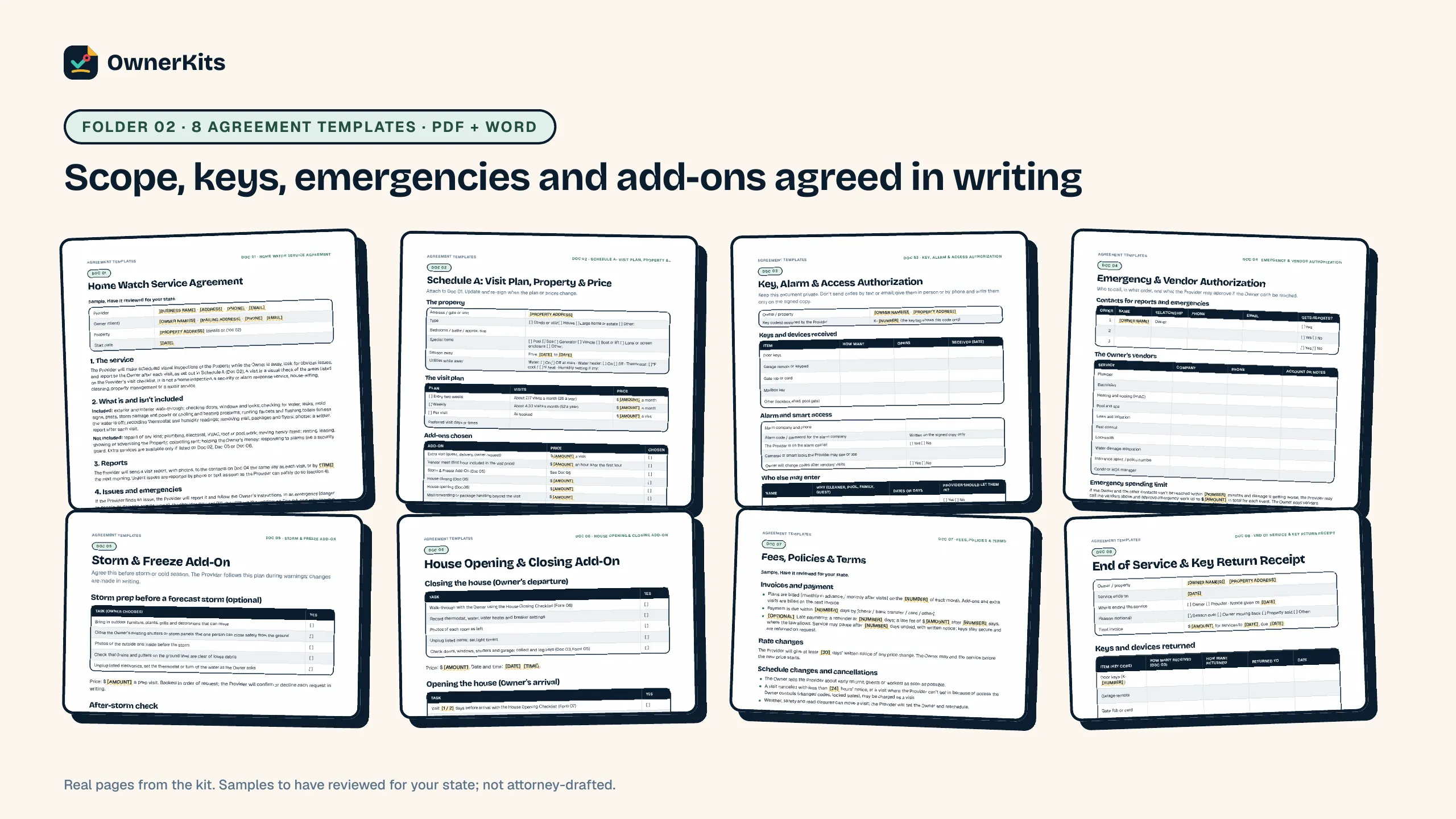
The paperwork matches the guide. Eight agreement templates cover the service agreement, the visit plan and price schedule, keys and alarm access, emergency contacts and a vendor spending limit, a storm and freeze add-on, a house opening and closing add-on, fees and policies, and an end of service and key return receipt. Eight forms cover the property profile, the visit checklist, the visit report, issue follow-up, a key custody log, house closing and opening checklists and an after-storm check. 16 ready-to-send messages handle inquiries, referral partners, onboarding, visit reports, issues, storms, freezes, invoices, rate changes and arrivals.

The Home Watch Pricing & Visit Tracker (Excel and Google Sheets, no macros) prices three home sizes from your own pay target, mileage and overhead, logs clients, visits and keys by code, shows the next visit date, flags late reports and sums visits and issues by month. A Letter flyer with an editable PowerPoint version is ready for your name and number. Everything is a sample to adapt, not legal or insurance advice; rules differ by state, and the guide links official sources (checked November 5, 2026).

  • Clear scope lines

    What a visit includes, what to price as an add-on, and what to leave to licensed pros or property managers, written into the agreement.

  • Prices from your own costs

    Time, mileage and overhead become a per-visit price, weekly and every-two-weeks plans and add-ons, in a tracker you can change.

  • A visit routine clients can see

    The same route, readings and same-day report every visit, plus an issue ladder for who to call and when.

  • Storms, freezes and seasons

    Storm prep, after-storm checks, freeze watch and house opening and closing agreed in writing before the season.

What's included

Every guide, form and tool, by job.

  • 33 pages, 6 chapters: what home watch is and isn't, set up, price your visits, the visit and the report, storms and seasonal services, find clients
  • Worked pricing example, issue ladder, 30-day plan and official sources

Features

What it helps you do

  • Home Watch Service Agreement

    11 sections: the service, what is and isn't included, reports, issues and emergencies, keys, the owner's part, fees, limits of the service, insurance, ending and general terms.

  • Visit plan and add-on pricing

    Schedule A sets the property, utilities while away, the visit plan and the add-ons chosen, with prices from the tracker.

  • Keys never labeled with an address

    Key codes, a custody log, a weekly count and a key return receipt, with codes kept off texts and reports.

  • Emergency and vendor limits

    Contacts in order, the owner's vendors and an emergency spending limit agreed in advance. Owners pay vendors directly.

  • Visit checklist and report

    Outside and inside checks, temperature and humidity readings, photos and a same-day report with facts, not guesses.

  • Storm and freeze plans

    Optional prep visits, after-storm checks when it's safe and legal to travel, and freeze-watch visits with a trigger temperature.

  • Pricing & Visit Tracker

    Cost floor, per-visit and plan prices for three home sizes, add-ons, clients, a visit log with next-visit dates, keys by code and a monthly summary.

  • Client messages and flyer

    16 ready-to-send messages and a Letter flyer with an editable PowerPoint version.

How it works

From checkout to your first quote.

  1. Step 1

    Buy once

    Checkout is handled by Gumroad, with no subscription.

  2. Step 2

    Download

    Your receipt has the download link; open 0 - START HERE.pdf first.

  3. Step 3

    Scope, price, practice

    Read the scope lines, set your prices in the tracker, then walk your own home with the visit checklist and make a sample report.

Files, requirements and updates

Files included

  • 6 × PDF guide, agreement templates, forms, messages, flyer and start guide (PDF)
  • 4 × Editable Word versions of the guide, agreements, forms and messages (DOCX)
  • 1 × Home Watch Pricing & Visit Tracker workbook (XLSX)
  • 1 × Editable flyer (PPTX)
  • 2 × Plain-text messages and license (TXT)

Requirements

  • Word, Google Docs or Pages to edit the documents (or print the PDFs)
  • Excel or Google Sheets for the tracker
  • PowerPoint, Google Slides or Canva for the flyer
  • A PDF reader

Works with

  • Windows
  • macOS
  • Excel
  • Google Sheets
  • Word
  • Google Docs
  • PowerPoint
  • Any PDF reader

Version history

  1. v1.0.0 (2026-11-05) — First release

FAQ

Questions about this product

Buying, downloads, refunds and how the app keeps your data: see all questions

What exactly do I get?

One ZIP with 14 files: the 33-page guide, 8 agreement templates, 8 visit forms and 16 messages (each as PDF and editable Word, messages also as plain text), the Home Watch Pricing & Visit Tracker (Excel), a flyer (PDF and PowerPoint), a START HERE page and a license file.

Do I need a license to run a home watch business?

There's no home watch license as such, but business registration and local licenses apply, and some tasks can need a license (for example renting or showing a home, or repairs). Chapter 1 lists what to check and links two Florida statutes as examples. Rules differ by state and city, so check locally.

Does it tell me what to charge?

It shows you how to price from your own costs. The worked example (a fictional business) prices a standard visit at $85 from 1.5 hours, 14 miles and an overhead share. Use your own numbers; the tracker recalculates.

Are the agreements attorney-drafted?

No. They are plain-language samples marked "Sample. Have it reviewed for your state." Have them reviewed by a local attorney before you rely on them.

Does it cover insurance?

It lists the questions to ask an insurance agent (liability, professional liability, property in your care, bonding, auto). It doesn't recommend a policy; your agent and policy wording decide what's covered.

Can I edit everything?

Yes. Every document has a Word version (opens in Word, Google Docs or Pages) with [PLACEHOLDERS] for your details, the tracker opens in Excel or Google Sheets, and the flyer has a PowerPoint version that also imports into Google Slides or Canva.

Is this connected with the National Home Watch Association?

No. OwnerKits is independent. The guide mentions the NHWA's optional accreditation so you can decide if it fits your business.

Ratings & reviews

Only verified buyers can review, using the license key from their purchase. We publish every review that follows our review policy, positive or negative.

    Loading reviews…

    Adding a service?

    Other kits

    Home Service Pricing Calculator & Price Increase Kit thumbnail with a price tag and calculator
    • NEW

    Excel Tool

    Home Service Pricing Calculator & Price Increase Kit

    An 8-tab Excel and Google Sheets pricing calculator with a filled-in example, a 32-page guide, 10 price increase letters, 12 texts and emails and 4 price list templates.

    $27 one-time

    Home Service SOP Templates & Operations Manual thumbnail with an SOP binder and stopwatch
    • NEW

    Template

    Home Service SOP Templates & Operations Manual

    24 ready-to-edit SOPs, 7 blank SOP templates, a fill-in operations manual, training and spot check sheets, an Excel SOP tracker and a 28-page guide.

    $27 one-time

    • NEW
    • KIT + APP

    Cleaning Business Starter Kit

    Set your hourly rate with the Pricing Calculator and run every clean from 23 room-by-room checklists.

    $37 one-time

    Support

    Email support@ownerkits.com or visit the support page.

    Refunds

    Full refund within 14 days of purchase. Refund policy.

    License

    One business. Use and edit the files for your own business and clients; don't resell or share them outside it. Read the license