- NEW
Spreadsheet
Home Service Bookkeeping Spreadsheet & Profit Tracker
An 11-tab Excel and Google Sheets workbook with a filled-in example, a 31-page plain-English guide and 8 printable logs for home service businesses. No macros.
$19 one-time
New: Cleaning Business Starter Kit — $37 one-time · See the Cleaning kit
Popular
No matches. Try a shorter word, like “mystery”, “word search” or “cleaning”.
See all productsPlan one paycheck at a time: see the bills due before your next payday, what's safe to spend, your sinking funds and goals, and payoff dates for your debts.
In the box
✦ About this product
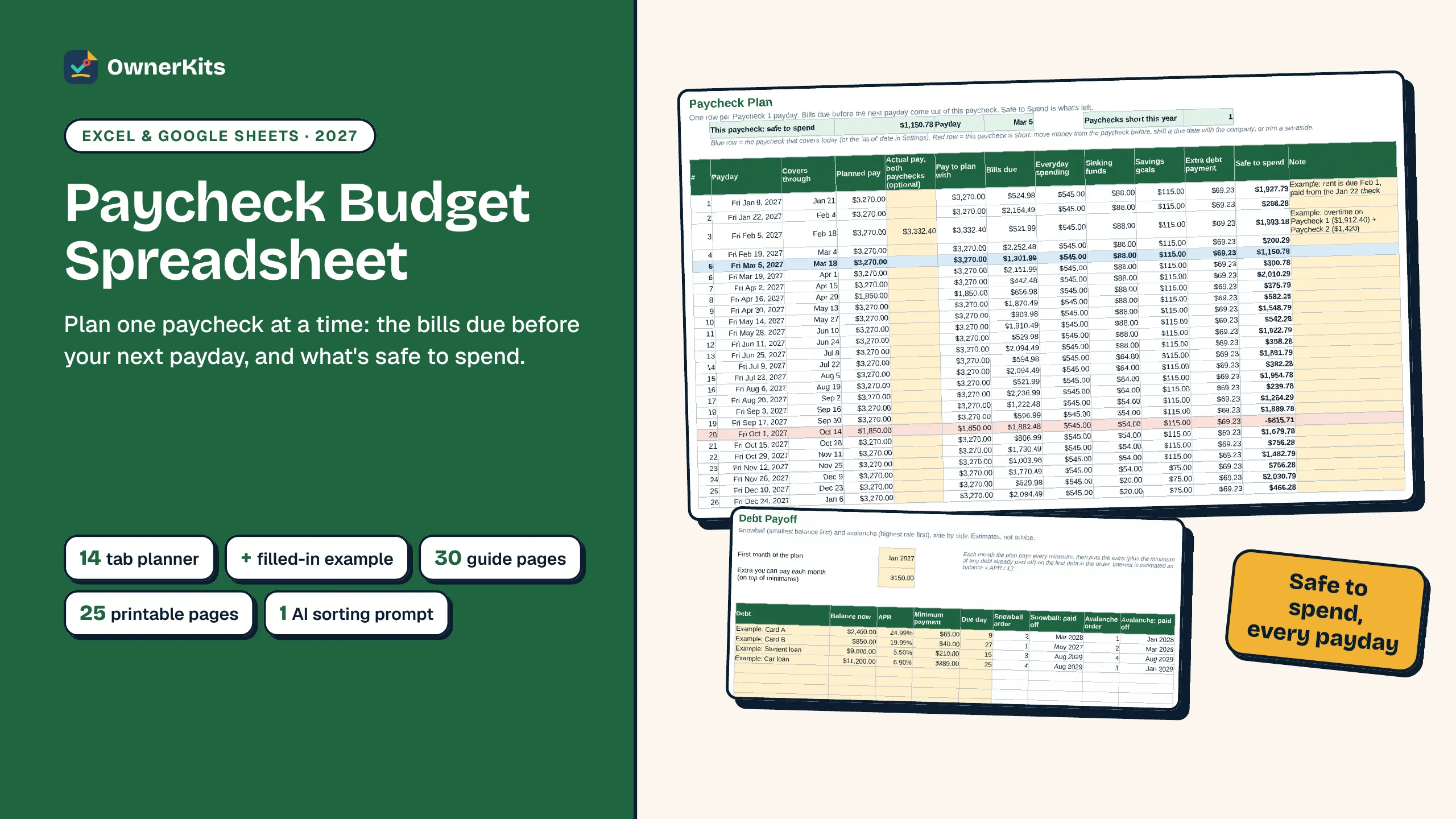
A monthly budget assumes all your money arrives on the 1st. If you're paid weekly, every 2 weeks or twice a month, it doesn't: rent can be due two days before payday, and some months bring a third paycheck. This planner works one paycheck at a time.
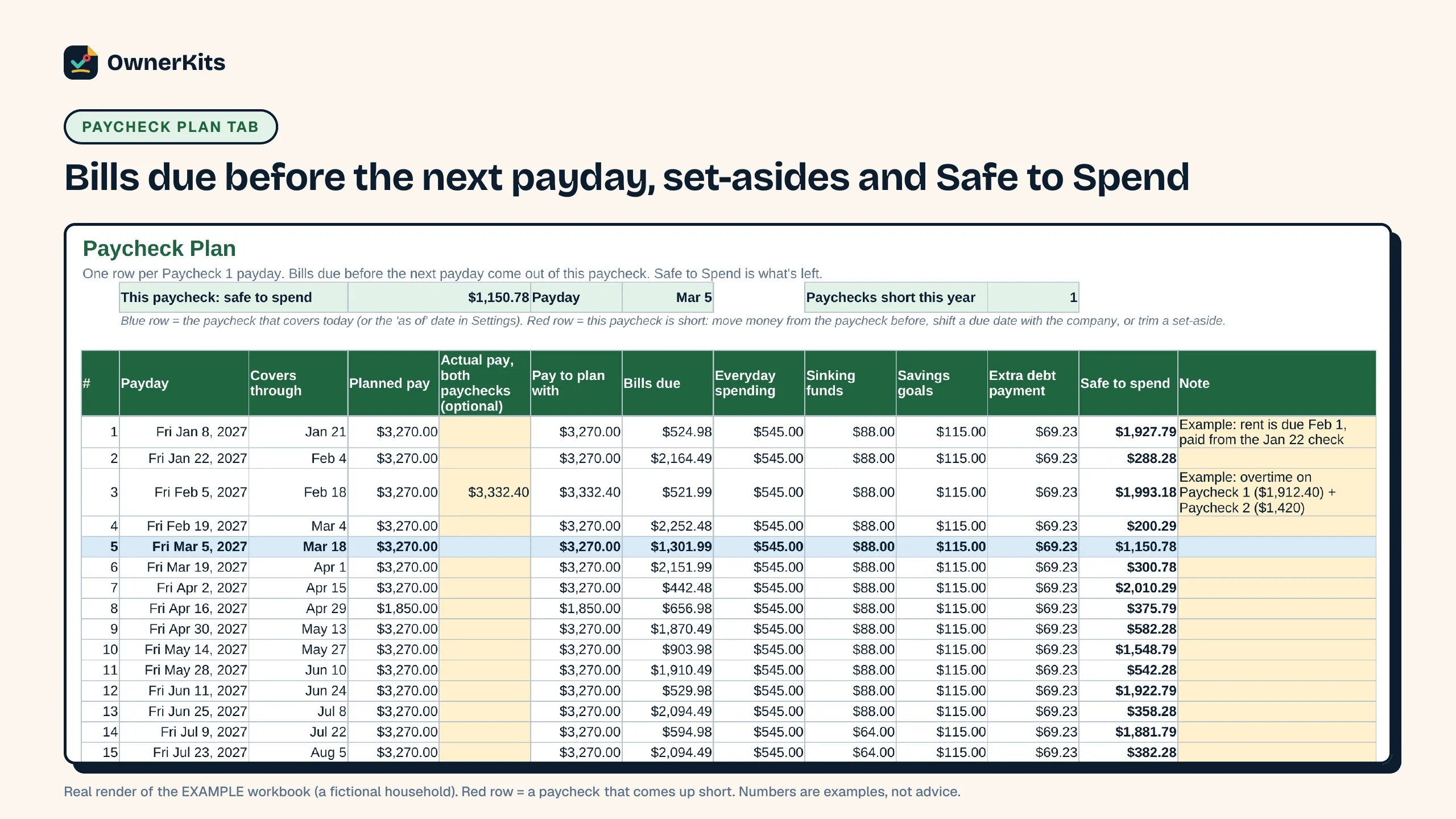
Set your pay schedule once (up to two paychecks), list your bills with how often they're due, and the Paycheck Plan shows every payday of the year with the bills due before the next one, your everyday spending, sinking funds, savings goals and extra debt payment, and what's left: your Safe to Spend number. A paycheck that comes up short turns red months ahead, and the Dashboard marks the months with an extra payday.
Sinking funds split known costs (holidays, car repairs, annual bills) across the paychecks left before the date. Savings goals show about when each one is reached. Debt Payoff lists up to 10 debts and estimates the payoff month for each in the snowball and avalanche orders, side by side, with total interest for both. A subscription audit, a spending log and a monthly plan-vs-actual summary complete it.
It works in Excel and Google Sheets with no macros, set for 2027 and usable for any year. A filled-in example, a 30-page guide, 25 printable pages (including a dated 2027 bill calendar) and an AI prompt to sort a bank export are included. It organizes your own numbers; it is not financial advice.
Safe to Spend, every payday
Each paycheck row shows the bills due before your next payday and what's left after everyday spending and set-asides.
Short paychecks flagged early
Red rows show the paychecks that can't cover their bills, so you can plan ahead from the one before.
Snowball and avalanche dates
Payoff month per debt and estimated total interest for both orders, side by side.
Sinking funds and goals
Known costs split per paycheck; goals show about when you'll reach them.
What's included
Features
Every payday of the year with bills due before the next payday, set-asides, extra debt payment and Safe to Spend.
Monthly, every 3 months, twice a year or yearly; each due date lands on the right paycheck. Mark subscriptions Keep, Cancel or Review.
Per-paycheck set-asides, goal dates, and snowball vs avalanche payoff months.
The year by month, months with an extra payday, and plan vs actual by category.
How it works
Checkout is handled by Gumroad, with no subscription.
Your receipt has the download link; open 0 - START HERE.pdf first.
Fill in Settings and your bills. Each paycheck row shows what's safe to spend.
FAQ
Buying, downloads, refunds and how the app keeps your data: see all questions
One ZIP with 10 files: the planner and a filled-in example (Excel), a 30-page guide and 25 printable pages (each as PDF and editable Word), an AI helper prompt with a CSV template, a START HERE page and a license file.
Yes. Upload the .xlsx to Google Drive, open it and choose File > Save as Google Sheets. It has no macros and uses only functions that work in both Excel and Sheets.
Yes. Set Paycheck 1 and Paycheck 2 with their own schedules. Each row of the plan is one Paycheck 1 payday, and Paycheck 2 is added when it lands in that window.
It's set for 2027 and includes a dated 2027 bill calendar. To plan another year, change the year and your first paydays in Settings.
It shows estimated payoff dates and interest for the snowball and avalanche orders so you can compare them. It doesn't recommend one, and it is not financial or credit advice. Check figures with your lenders.
No. The AI helper is optional: it sorts a bank export into your categories. If you use it, paste only dates, descriptions and amounts, never account numbers or passwords.
The license covers one household. Please don't share or resell the files.
Only verified buyers can review, using the license key from their purchase. We publish every review that follows our review policy, positive or negative.
Loading reviews…
You might also like
Spreadsheet
An 11-tab Excel and Google Sheets workbook with a filled-in example, a 31-page plain-English guide and 8 printable logs for home service businesses. No macros.
$19 one-time
Workbook
A 31-page year-end review and 2027 planning workbook, 39 printable dated planner pages and a goal & revenue spreadsheet for cleaning, lawn, handyman and other home service businesses.
$19 one-time

Ebook
300 fill-in prompts for Claude, the BRIEF formula, Quick Fixes, a cheat sheet and an A-to-Z Prompt Finder. 200-page PDF + EPUB.
$9.99 one-time
Email support@ownerkits.com or visit the support page.
Full refund within 14 days of purchase. Refund policy.
One household. Use and edit the files for your own budgeting; don't resell or share them. Read the license
Paycheck Budget Spreadsheet: Excel & Google Sheets$17 one-time
Buy now